Our Services

Why choose us
Custom Mobile App Development
We build apps from the ground up — tailored to your brand, audience, and functionality needs.
iOS App Development
Native iPhone and iPad apps using Swift and Objective-C that meet Apple’s high performance and design standards.
Android App Development
Robust Android apps developed in Kotlin and Java, compatible with all Android devices and OS versions.
App Maintenance & Support
We offer post-launch support, performance monitoring, updates, and upgrades to keep your app running smoothly.
Cross-Platform App Development
One codebase, multiple platforms. We use Flutter and React Native to deliver cost-effective apps for both iOS and Android.
App Store Deployment
We handle the entire submission process for the App Store and Google Play — ensuring your app meets all guidelines.
App Development
App development is the process of creating software applications that run on mobile devices or desktop platforms. It involves writing code, designing user interfaces, integrating with databases or services, and testing to ensure functionality and performance.
Web Development
Website development is the process of building and maintaining websites. It involves everything from coding and programming to designing layouts, managing content, and ensuring accessibility across devices and browsers.
Content Marketing
Content marketing is a strategic marketing approach focused on creating and sharing valuable, relevant, and consistent content to attract and engage a clearly defined audience — and ultimately drive profitable customer action.
Social Media Marketing
Social Media Marketing (SMM) is the use of social media platforms to connect with your audience to build your brand, increase sales, and drive website traffic through content, ads, and community engagement.
SEO Audits & Strategy
SEO (Search Engine Optimization) is the practice of improving your website’s visibility in search engine results. A solid SEO audit reveals what’s helping or hurting your site’s rankings, and a strategy outlines how to improve.
Planning & Strategy
Planning and strategy are critical components in achieving any business, project, or marketing goal. They provide direction, focus, and a framework for decision-making, ensuring that actions align with your long-term objectives.

PRINTER SETUP AND INSTALLATION
Connect your printer to the computer or Wi-Fi
Click on Download to install the drivers
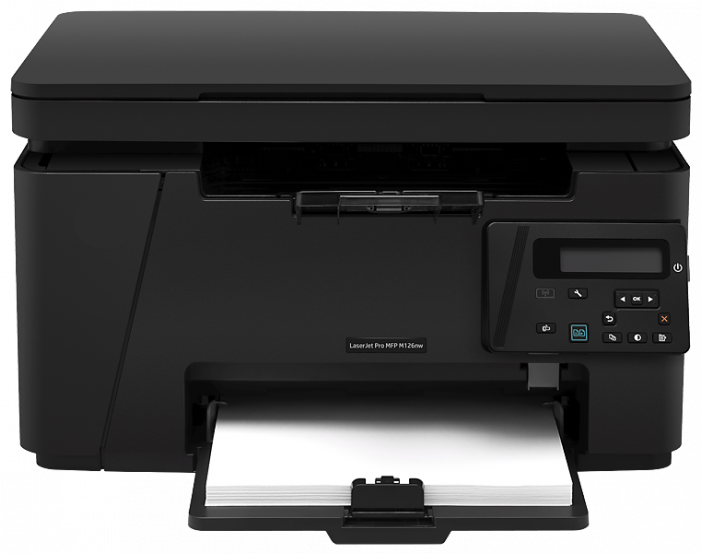
How to Set Up a Printer – Step-by-Step Guide
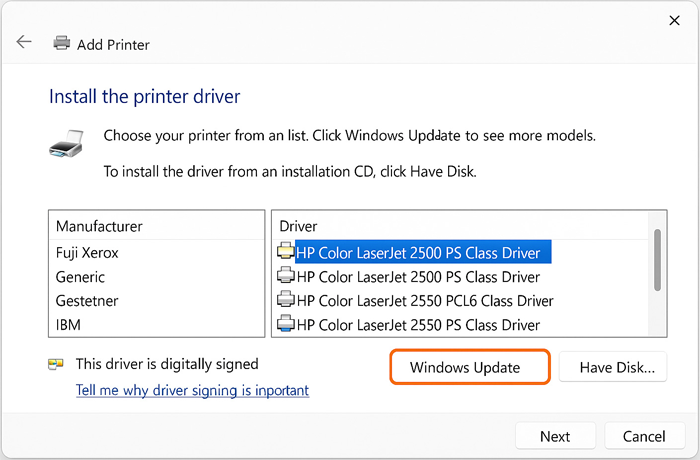
- Unbox the Printer
Carefully remove the printer from its box and place it on a flat, stable surface.
- Connect to Power
Plug in the power cable and switch on the printer using the power button.
- Install Ink or Toner Cartridges
Open the cartridge access door and insert the cartridges into their correct slots.
- Load Paper into the Tray
Place plain, compatible paper into the input tray. Align it properly for smooth printing.
- Set Up Basic Preferences
On the printer screen, select your language, date, time, and region.
- Download Printer Software
Visit the official website of your printer brand and download the latest drivers and setup software.
- Connect the Printer to Your Device
Use a USB cable or connect via Wi-Fi/Bluetooth based on your printer model and preference.
- Print a Test Page
Try printing a sample document to ensure your printer is working correctly.
Printer Setup
Download Your Printer Drivers
Select Your Printer Model




Print | Scan | Copy | Fax
Your World Renowned
Printer
Assistant
Printers for Home & Office
Needs
* Connect Wireless Printer
* Printer Driver Download
* Setup your Printer Quickly
Frequently Asked Questions
Q: What are the steps to setup a new printer?
A: Setting up a printer is a straightforward process if you have some knowledge about printing devices. But if you’re a newbie with a printer, then be careful, as a single misstep can make your printer out of order.
Step 1: Plug in your printer and connect it to a wifi device.
Step 2: Visit your printer’s manufacturer’s website.
Step3: Provide your printer model in the search box.
Step 4: Click on the Driver and Download option from the dashboard.
Step 5: Download the Driver for your printer and install it.
Step 6: Print a demo document to check whether your printer is set up correctly.
Q: My printer is not working properly. What are the reasons?
A: There are many reasons for a printer not working, including Outdated printer drivers, incorrect configuration, empty ink cartridges, wifi error, driver error, etc. Let our professionals help you get the best results with your printer.
Q: I changed my printer cartridges recently, and my printer has not been working since then.
A: Sometimes, when we change the ink cartridge or refill it, the printer still reads it as an empty cartridge, or sometimes, it doesn’t even recognize the new ink cartridge. You can try resetting your printer cartridge settings or reinstalling your printer’s ink cartridge.