Plans & Pricing
We are among India’s best web solution companies committed to offering full ROI-driven customized web services at affordable prices. Due to its excellent e-commerce website and graphics designs, Flown Developer is one of the top Apps development

Our Plans
Here are common types of app and web development plans, categorized by their approach and target platform:
Standard Plan

Features Includes
- 5 pages Website
- 1 Year Free Domain Name ( .com .in .org )
- 1 Year Free Cloud Hosting
- Dynamic Website ( Premium Design )
- Admin Access
- Lifetime 24/7 Free Hosting Support
- Unlimited Images & Videos Upload
- Free SSL Certificates
- 5 Free Email Id
- SEO Friendly Website
- 100% Responsive Website
- Live Chat Integration
- Payment Gateway Integration
- Social Media Integration
- Call Button Integration
- WhatsApp Button Integration
- Inquiry Form
- 1 Year Free Technical Support For Website
Premium Plan

Features Includes
- 12 pages Website
- 1 Year Free Domain Name ( .com .in .org )
- 1 Year Free Cloud Hosting
- Dynamic Website ( Premium Design )
- Admin Access
- Google Search Console Setup
- Lifetime 24/7 Free Hosting Support
- Unlimited Images & Videos Upload
- Free SSL Certificates
- 10 Free Email Id
- SEO Friendly Website
- 100% Responsive Website
- Live Chat Integration
- Payment Gateway Integration
- Social Media Integration
- Call Button Integration
- WhatsApp Button Integration
- Inquiry Form
- Woocommece Features
- 1 Year Free Technical Support For Website
Custom Plan

Features Includes
- Pages: According to Requirement
- 1 Year Free Domain Name ( .com .in .org )
- 1 Year Free Cloud Hosting
- Dynamic Website
- Admin Access
- Google Search Console Setup
- Lifetime 24/7 Free Hosting Support
- Unlimited Images & Videos Upload
- Free SSL Certificates
- 10 Free Email Id
- SEO Friendly Website
- 100% Responsive Website
- Live Chat Integration
- Payment Gateway Integration
- Social Media Integration
- Call Button Integration
- WhatsApp Button Integration
- Inquiry Form
- Woocommerce Features
- 1 Year 24/7 Free Support For Website
Premium Design E-commerce Plan

Features Includes
- 30 pages Website
- 1 Year Free Domain Name ( .com .in .org )
- 1 Year Free Cloud Hosting
- 20 Product Categories
- 30 Product Listing From Our Side
- Premium Design
- Dynamic Website
- Admin Access
- Google Search Console Setup
- Lifetime 24/7 Free Hosting Support
- Unlimited Images & Videos Upload
- Free SSL Certificates
- 10 Free Email Id
- Premium Theme
- SEO Friendly Website
- 100% Responsive Website
- Live Chat Integration
- Payment Gateway Integration
- Social Media Integration
- Call Button Integration
- WhatsApp Button Integration
- Inquiry Form
- Ecommece Features
- Product Variation Features
- Auto Invoice Bill Generater Features
- Wallet System Features
- Order Notification Features
- OTP Verification Features
- 1 Year Free Technical Support For Website
- Annual Renewal For Hosting Rs.4000.
Multi-vendor Business & E-commerce Plan

Features Includes
- 40 pages Website
- 1 Year Free Domain Name ( .com .in .org )
- 1 Year Free Cloud Hosting
- 50 Products Categories
- 30 Products Listing from our side
- Premium Design
- Dynamic Website
- Admin Access
- Google Search Console Setup
- Dynamic Multi-Vendor Website
- Lifetime 24/7 Free Hosting Support
- Unlimited Images & Videos Upload
- Free SSL Certificates
- 20 Free Email Id
- SEO Friendly Website
- 100% Responsive Website
- Live Chat Integration
- Payment Gateway Integration
- Social Media Integration
- Call Button Integration
- WhatsApp Button Integration
- Inquiry Form
- Multi-Level Ecommece Features
- Product Variation Features
- Auto Invoice Bill Generater Features
- Wallet System Features
- Order Notification Features
- OTP Verification Features
- 1 Year Free Technical Support For Website
- Annual Renewal For Hosting Rs.4000.
Custom Multi-vendor Business & E-commerce Plan
Features Includes
- Pages: According to the requirements
- 1 Year Free Domain Name ( .com .in .org )
- 1 Year Free Cloud Hosting
- ?? Products Categories
- ?? Products Listing from our side
- Premium Design
- Dynamic Website
- Admin Access
- Google Search Console Setup
- Dynamic Multi-Vendor Website
- Lifetime 24/7 Free Hosting Support
- Unlimited Images & Videos Upload
- Free SSL Certificates
- 20 Free Email Id
- SEO Friendly Website
- 100% Responsive Website
- Live Chat Integration
- Payment Gateway Integration
- Social Media Integration
- Call Button Integration
- WhatsApp Button Integration
- Inquiry Form
- Multi-Level Ecommece Features
- Product Variation Features
- Auto Invoice Bill Generater Features
- Wallet System Features
- Order Notification Features
- OTP Verification Features
- 1 Year Free Technical Support For Website
- Annual Renewal For Hosting Rs.4000.

PRINTER SETUP AND INSTALLATION
Make sure your printer is powered on
Connect your printer to the computer or Wi-Fi
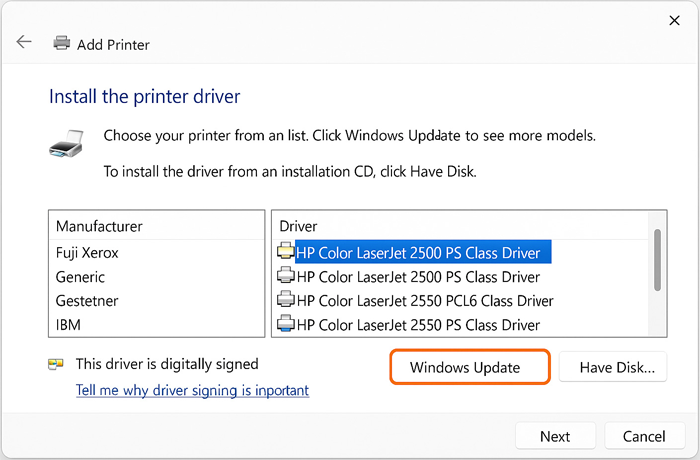
Click on Download to install the drivers
Connect your printer to the computer or Wi-Fi
Click on Download to install the drivers
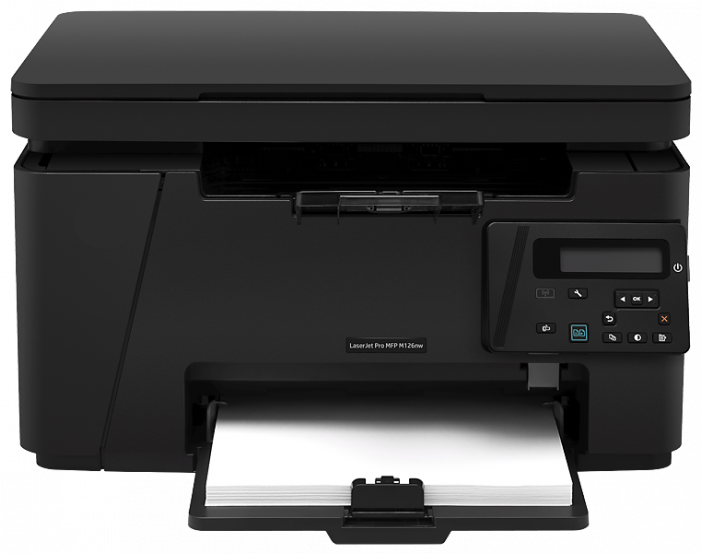
How to Set Up a Printer – Step-by-Step Guide
- Unbox the Printer
Carefully remove the printer from its box and place it on a flat, stable surface.
- Connect to Power
Plug in the power cable and switch on the printer using the power button.
- Install Ink or Toner Cartridges
Open the cartridge access door and insert the cartridges into their correct slots.
- Load Paper into the Tray
Place plain, compatible paper into the input tray. Align it properly for smooth printing.
- Set Up Basic Preferences
On the printer screen, select your language, date, time, and region.
- Download Printer Software
Visit the official website of your printer brand and download the latest drivers and setup software.
- Connect the Printer to Your Device
Use a USB cable or connect via Wi-Fi/Bluetooth based on your printer model and preference.
- Print a Test Page
Try printing a sample document to ensure your printer is working correctly.